MICROSOFT PURVIEW
ON-DEMAND CLASSIFICATION
Bridging the decision gap between protecting sensitive data and pay-as-you-go costs
Compliance admins knew they needed to protect old sensitive data that was likely sitting untouched across their environment, but Microsoft Purview’s paid scanning process meant understanding what to protect had cost implications.
I designed the experience that let compliance admins measure both the security impact and the cost implications to make confident decisions on what data they should be scanning.
BUSINESS IMPACT
320+
Billed tenants
3k
Scans initiated
$700k
Revenue generated in last 30 days
*Impact metrics for the past 6 months as of September 2026
BEFORE WE DIVE IN

WHAT IS
MICROSOFT
PURVIEW?
Microsoft Purview is Microsoft’s compliance suite for enterprises, a set of tools that help organisations protect sensitive data and meet regulations like HIPAA, GDPR etc.
WHAT IS DATA CLASSIFICATION?
It’s a process of scanning through and tagging data that contains ‘sensitive information’. This ‘tagging’ lets admins and other Purview tools know which data needs what type of protection.
DATA CLASSIFICATION SYSTEM scans data in the environment
Apply classification marker to files containing sensitive information
Other Purview tools apply protections to data marked sensitive.
WHO ARE
THE USERS?
Compliance admins and Information protection teams in mid to large sized organisations.

THE CONTEXT
Microsoft Purview data classification system is forward looking
DAY 0
Not onboarded to Purview
- Lots of business data already exists in the system.
DAY 1
Onboards to Microsoft Purview
- Files generated or used after onboarding start getting classified.
- Older unused files not classified.
DAY n
Admin creates a new classifier
- Files generated or used after creation of new classifier start getting classified.
- Older unused files not scanned for new classifier.
DAY 0
Not onboarded to Purview
- Lots of business data already exists in the system.
DAY 1
Onboards to Microsoft Purview
- Files generated or used after onboarding start getting classified.
- Older unused files not classified.
DAY n
Admin creates a new classifier
- Files generated or used after creation of new classifier start getting classified.
- Older unused files not scanned for new classifier.
THE PROBLEM
USER CONCERNS
BUSINESS CONCERNS
Compliance risk.
Without data at rest classification, admins had no full picture of the sensitive data sitting across their environment.
“HIPAA regulation says we must protect all patient data, not just new patient data.”
- Purview user
Other Purview users raised similar concerns.
Cost implications.
Spending on scans would need approval from finance/leadership teams. On-demand data classification was planned as a pay-as-you-go feature at about $20 per 10k files, outside of their E5 licence.
“...within Microsoft generally you can enable and turn everything on and it looks great, sounds great, but then once you get the bill, you know, you're scared to death.”
- Purview user
Blocker for migrating to Purview.
Old files remaining unprotected was a blocker to adopting Microsoft Purview.
“Existing untouched data on 45k machines protected by Symantec should continue to remain protected after moving to Microsoft Endpoint DLP.”
- Purview user
Blocker to AI adoption.
Copilot could potentially read unclassified data contents and surface them to any employee who was never meant to see that information.
“A Purview user wants to ensure that secret/highly confidential emails in top managers' mailboxes are not processed by Copilot M365.”
- Purview user
Other Purview users raised near-identical concerns.
How might we help compliance admins make the choice to scan data confidently?
THE PROBLEM
USER CONCERNS
Compliance risk.
Without data at rest classification, admins had no full picture of the sensitive data sitting across their environment.
“HIPAA regulation says we must protect all patient data, not just new patient data.”
- Purview user
Other Purview users raised similar concerns.
Cost implications.
Spending on scans would need approval from finance/leadership teams. On-demand data classification was planned as a pay-as-you-go feature at about $20 per 10k files, outside of their E5 licence.
“...within Microsoft generally you can enable and turn everything on and it looks great, sounds great, but then once you get the bill, you know, you're scared to death.”
- Purview user
BUSINESS CONCERNS
Blocker for migrating to Purview.
Old files remaining unprotected was a blocker to adopting Microsoft Purview.
“Existing untouched data on 45k machines protected by Symantec should continue to remain protected after moving to Microsoft Endpoint DLP.”
- Purview user
Blocker to AI adoption.
Copilot could potentially read unclassified data contents and surface them to any employee who was never meant to see that information.
“A Purview user wants to ensure that secret/highly confidential emails in top managers' mailboxes are not processed by Copilot M365.”
- Purview user
Other Purview users raised near-identical concerns.
How might we help compliance admins make the choice to scan data confidently?
THE PROCESS & DECISIONS
Decisions that shaped the experience
I took this project over after the initial flow was designed and tested with the users. I took the insights from the research and began with iterations.
01
Splitting the scan into distinct steps
HYPOTHESIS
The initial hypothesis was that admins would start classification of data directly as the need and benefits of protecting data are obvious.
RESEARCH INSIGHTS
However, during research we found that all participants said that they would want ‘simulation’ first and not directly classify data.
Admins could not commit to a scan until they knew how much it would cost.
Approvals from finance or leadership would be required before deploying a pay-as-you-go capability.
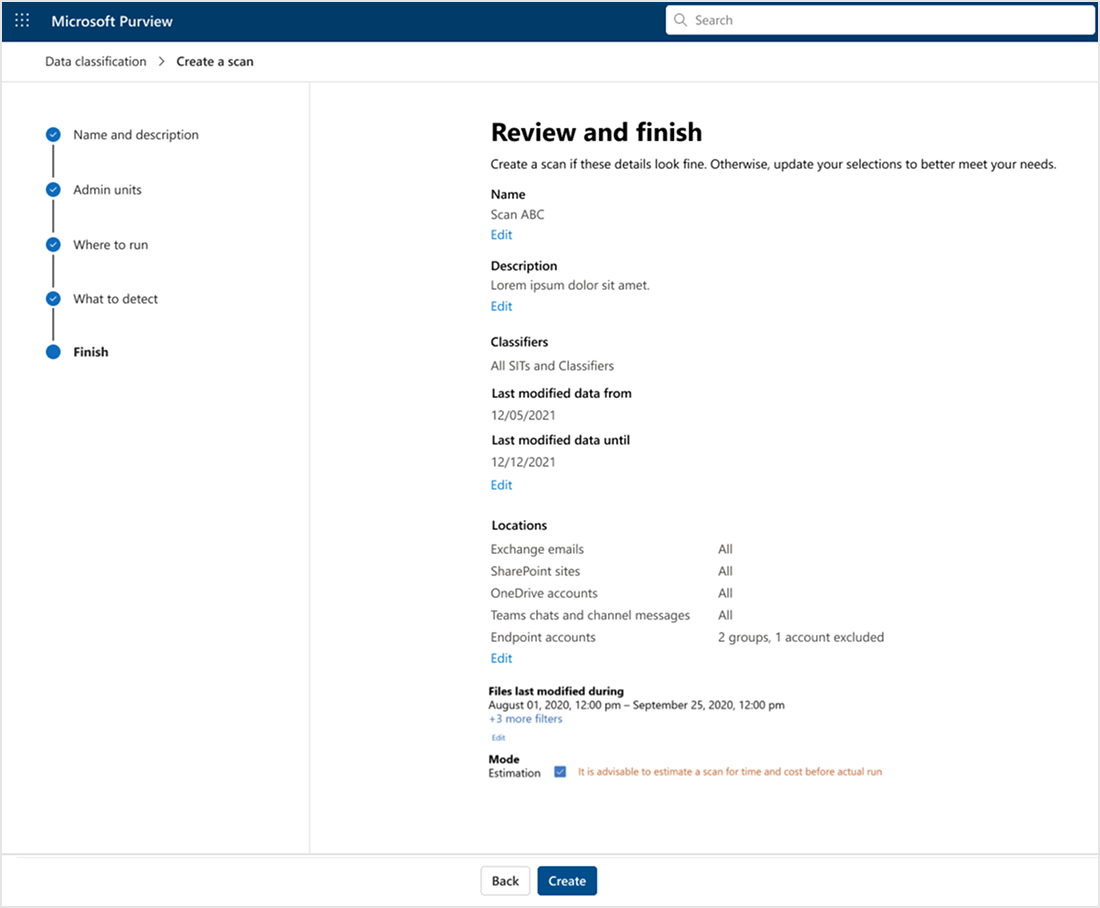

Estimation as an option in the final step of scan creation
DECISION
Make On-demand scanning a two-step process
- Estimation - no cost determines the scope of the scan
- Classification - scanning the determined scope for classifiers
REASONING
Compliance admins have a mental model of ‘simulating’ policies as first step before deploying it in other Purview workflows. So having a step before they commit to classifying data was a well tested way to build user confidence in the feature.
OUTCOME
Estimation was made compulsory.
This would ensure transparency making admins aware of the costs before committing to a scan.
TRADEOFF
Admin needs to initiate classification after estimation is complete.
THE PROCESS & DECISIONS
Decisions that shaped the experience
I took this project over after the initial flow was designed and tested with the users. I took the insights from the research and began with iterations.
01
Splitting the scan into distinct steps
HYPOTHESIS
The initial hypothesis was that admins would start classification of data directly as the need and benefits of protecting data are obvious.
RESEARCH INSIGHTS
However, during research we found that all participants said that they would want ‘simulation’ first and not directly classify data.
Admins could not commit to a scan until they knew how much it would cost.
Approvals from finance or leadership would be required before deploying a pay-as-you-go capability.
Estimation as an option in the final step of scan creation
DECISION
Make On-demand scanning a two-step process
- Estimation - no cost determines the scope of the scan
- Classification - scanning the determined scope for classifiers
REASONING
Compliance admins have a mental model of ‘simulating’ policies as first step before deploying it in other Purview workflows. So having a step before they commit to classifying data was a well tested way to build user confidence in the feature.
OUTCOME
Estimation was made compulsory.
This would ensure transparency making admins aware of the costs before committing to a scan.
TRADEOFF
Admin needs to initiate classification after estimation is complete.
02
Making progress visible
CONTEXT
Admins need to initiate the classification step after the estimation is complete, therefore, it’s really important for users to know clearly which phase they were in to initiate the next phase.
DECISION
Made the two phases explicit in the interface.
USER TESTING
I explored a few different ways based on what was available in the design system and also created a custom component by modifying existing components. I A/B tested these with the users.
ON-DEMAND CLASSIFICATION STATUS INDICATOR
WHY I PICKED THIS
During A/B testing, 5 of 5 users could clearly decipher what part of the scan process they were in.
Collaborating with the content designer, I made ‘Step 1’ and ‘Step 2’ explicit.
This was a custom component I created by modifying an existing component from the design system. For the sake of product consistency, a custom component wasn’t my first choice, but in this scenario the other status components did not meet the requirements.
OTHER EXPLORATIONS AND WHY THEY FAILED
EXPLORATION 1
Based on the audited pattern used in Microsoft Privacy.
- Failed to scale to the various states that were required to be shown.
- Failed to communicate clearly that the next step was an explicit user action.
EXPLORATION 2
Based on Purview header component showing state of page.
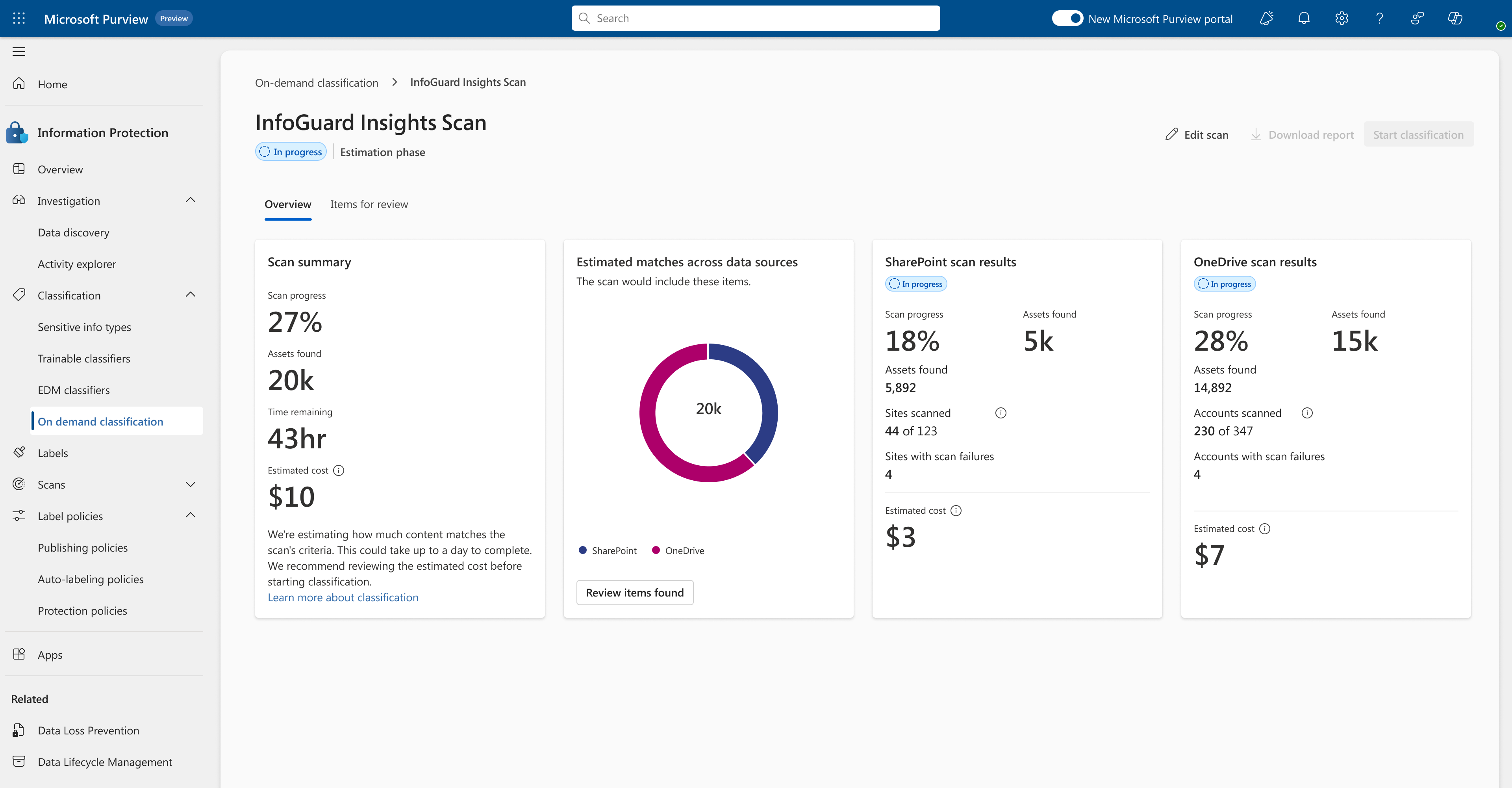
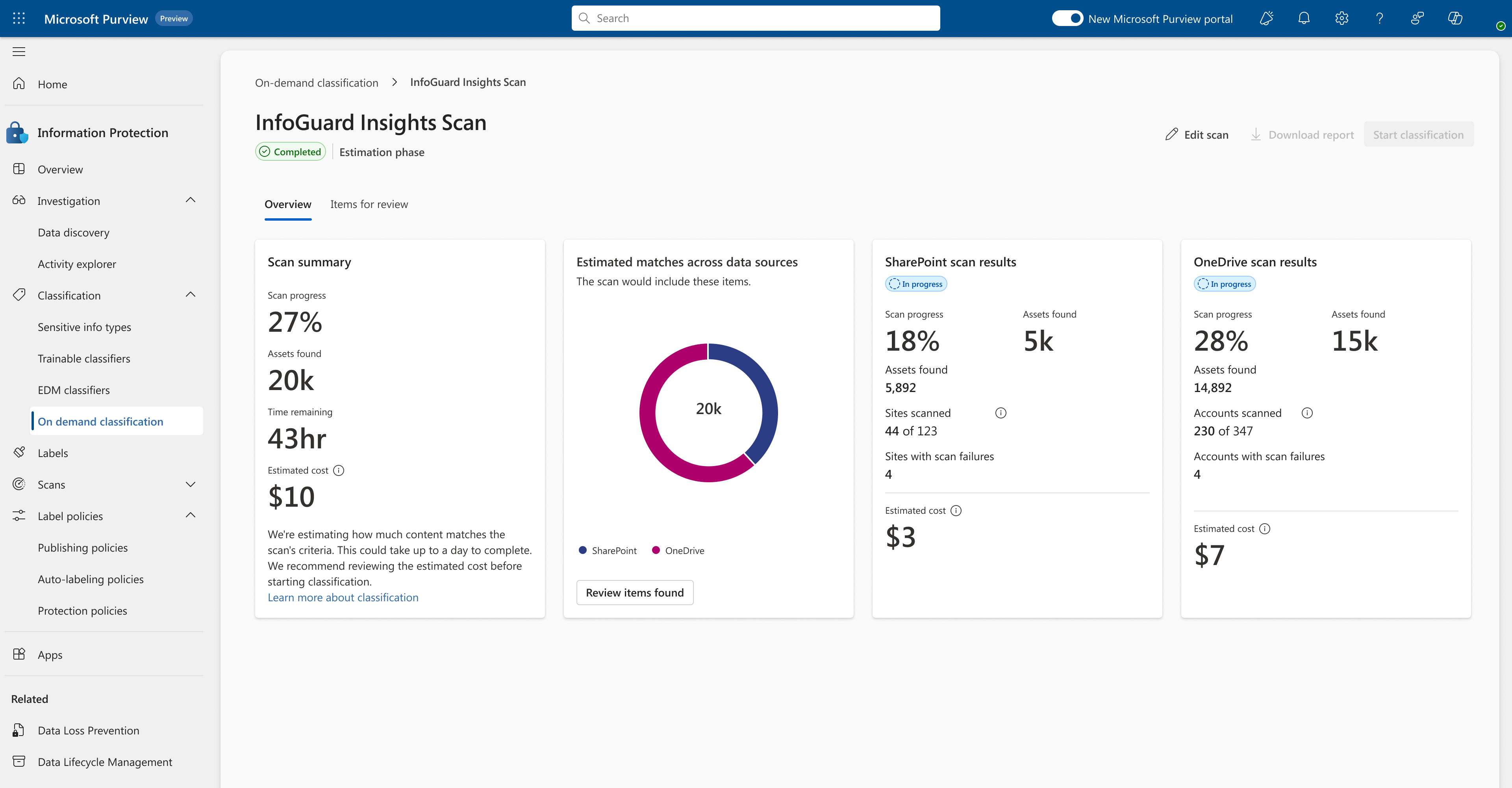
- 2 of 5 users could not clearly understand that they needed to take action to go to the next step from this status alone.
03
Surfacing and pairing information strategically
I asked myself,
WHAT DO USERS NEED TO MAKE A DECISION?
User research analysis surfaced the top needs:
- What needs to be scanned?
- How much will it cost me?
- How long will it take?
HEURISTIC EVALUATION
Apart from the user research insights, I looked at the V1 designs and made some observations.
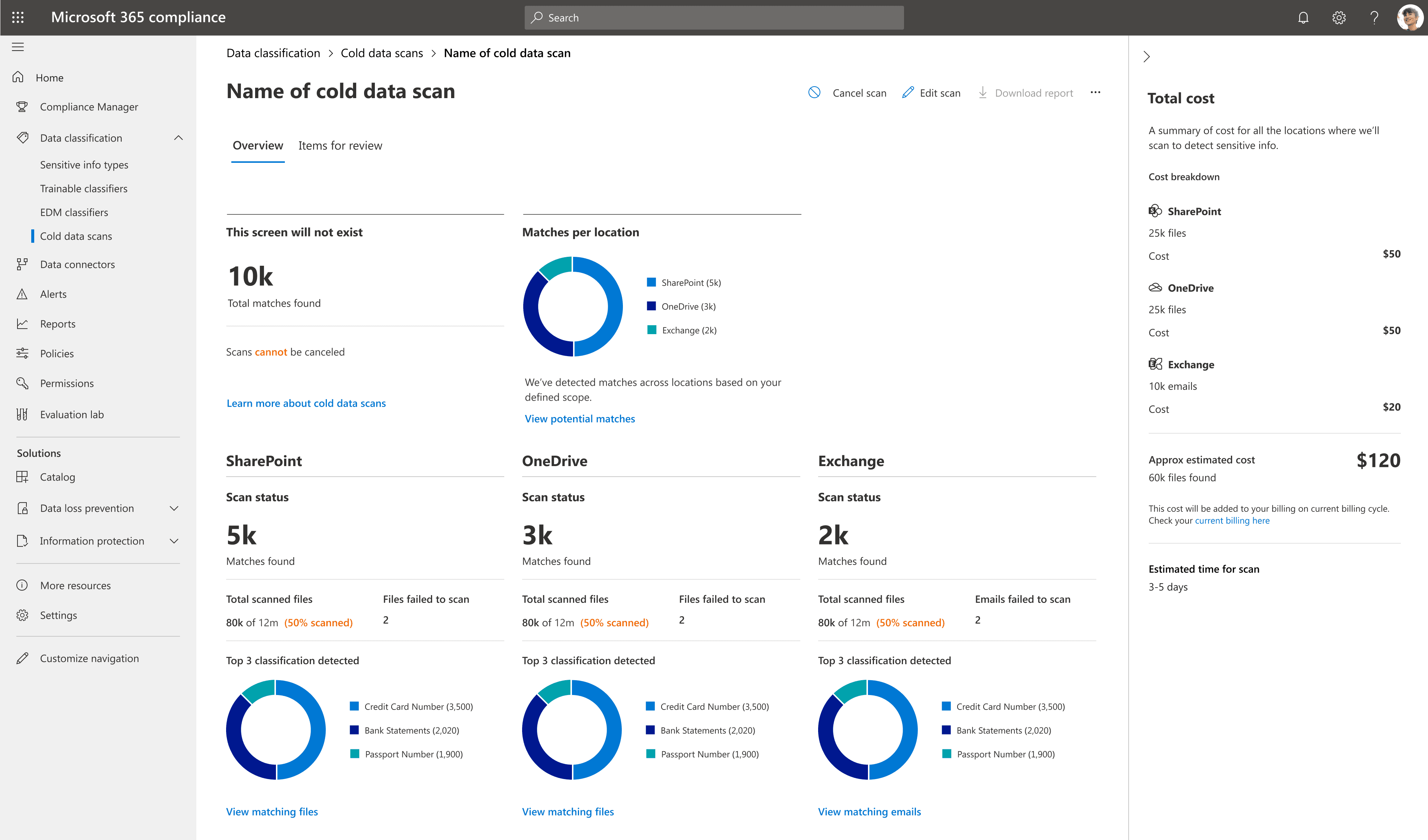
- Information hierarchy not clear.
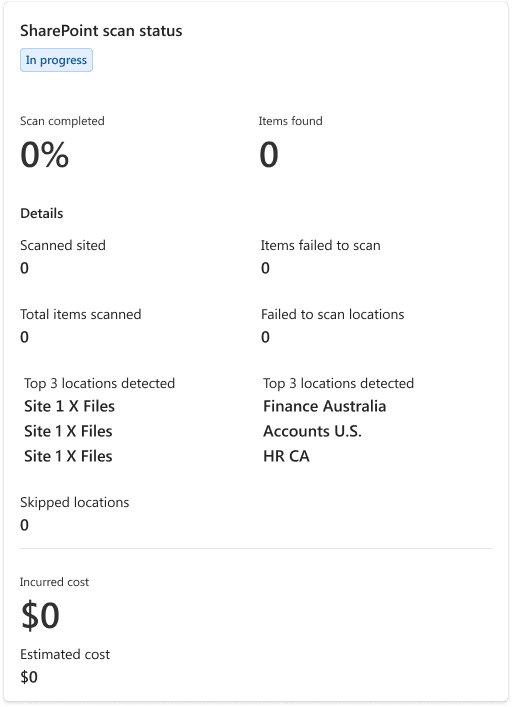
- Cost which was an important factor was shown in a collapsible side drawer.
- What do the text and numbers in colour depict?
- Duplication of information.
ADDED CONTEXT
Product requirement to add more information to the classification phase metrics.
DECISION
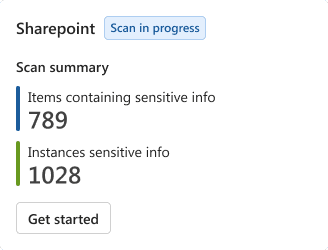
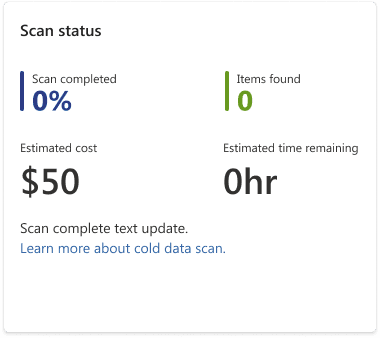
Refine information architecture and use card component to surface and segregate information.
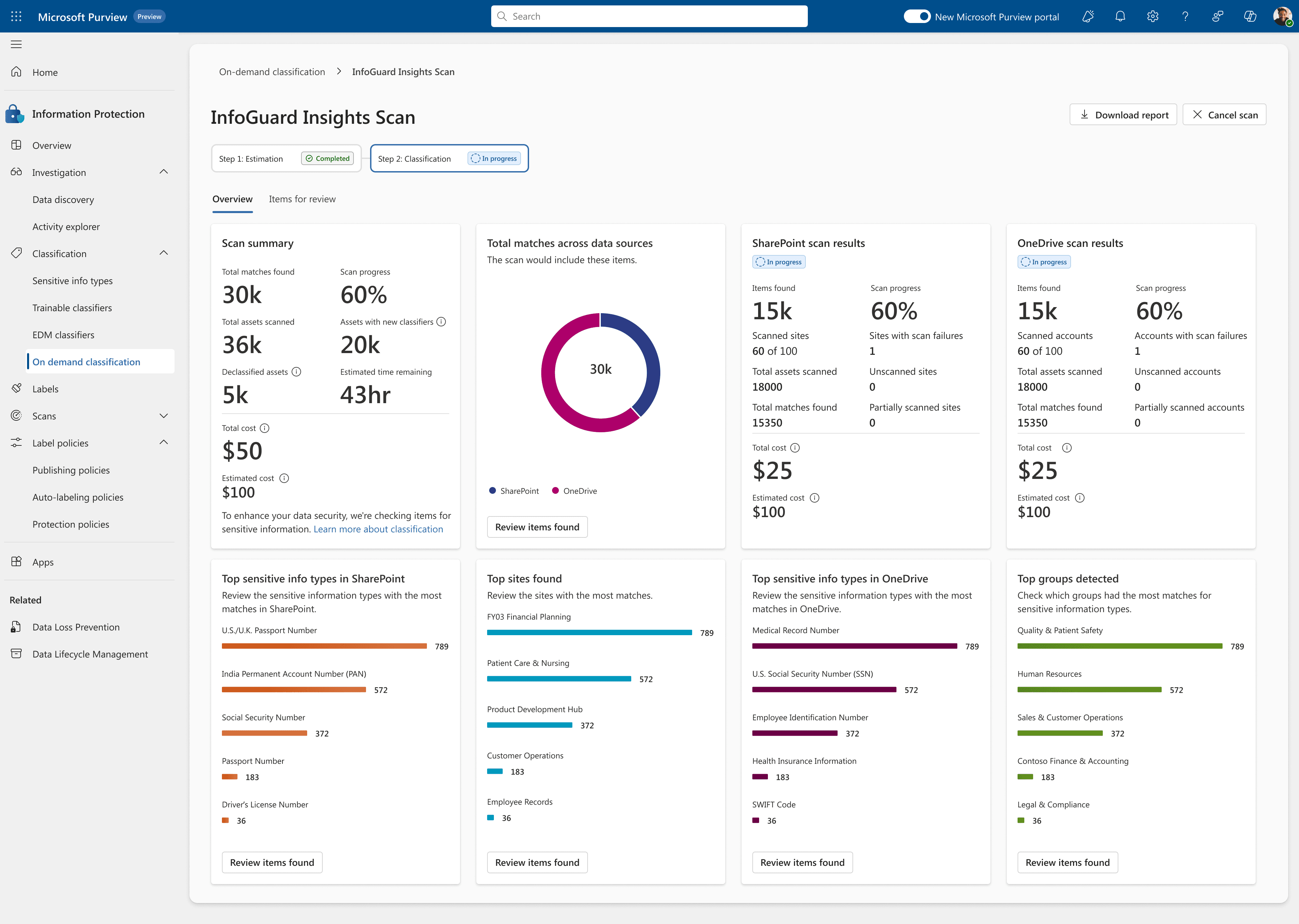
For On-demand classification, the most important aspect was to convey to the user the value of classification against the cost, thus I gave the information architecture of the cards a lot of thought.
These are the cards that I finalised with the reasoning behind it.
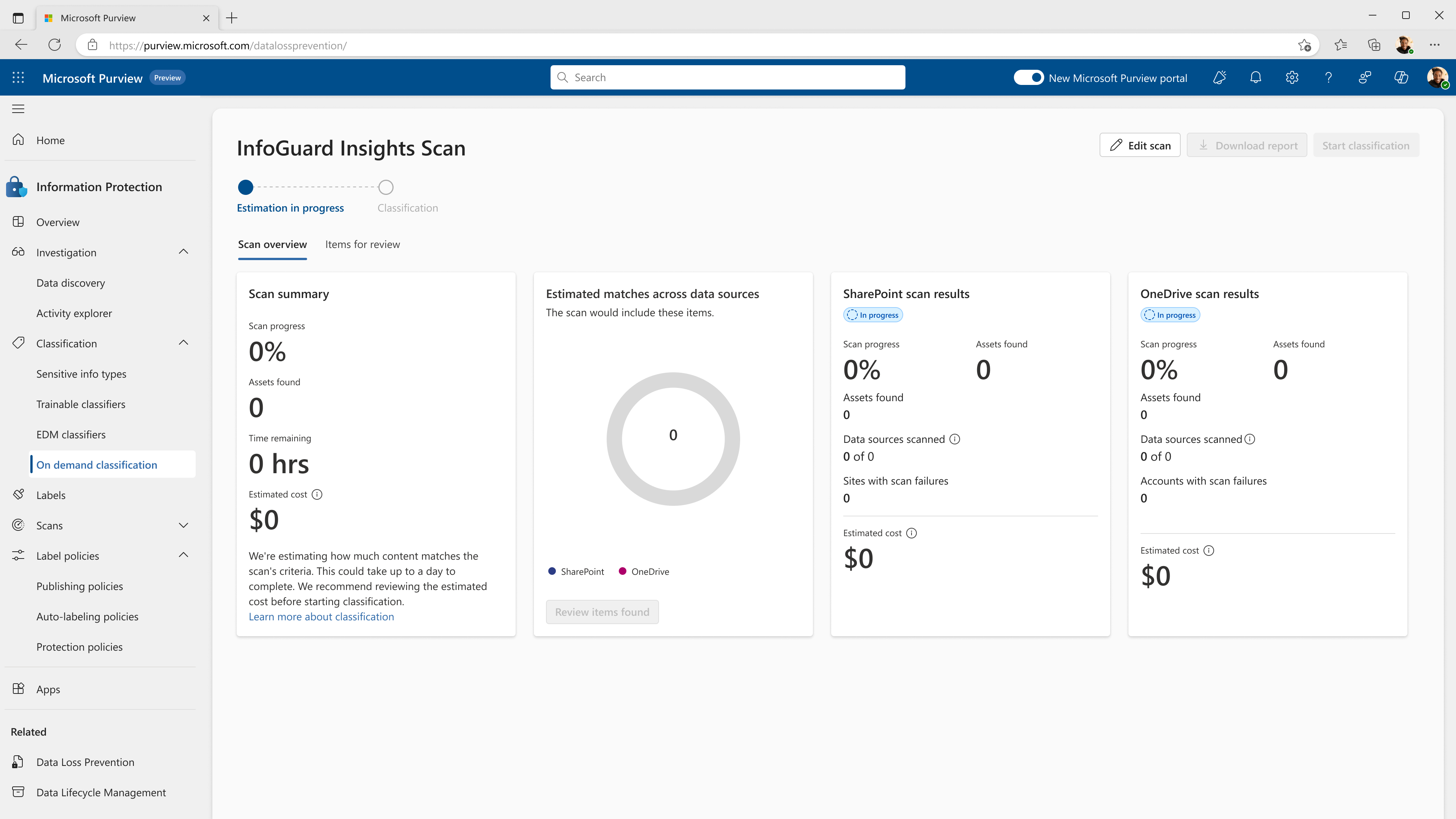
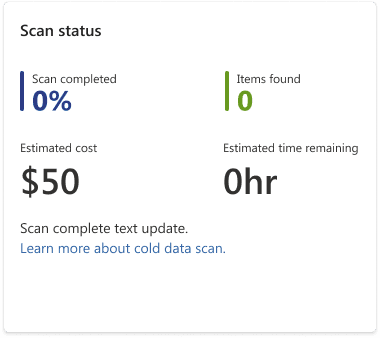
SCAN OVERVIEW - ESTIMATION
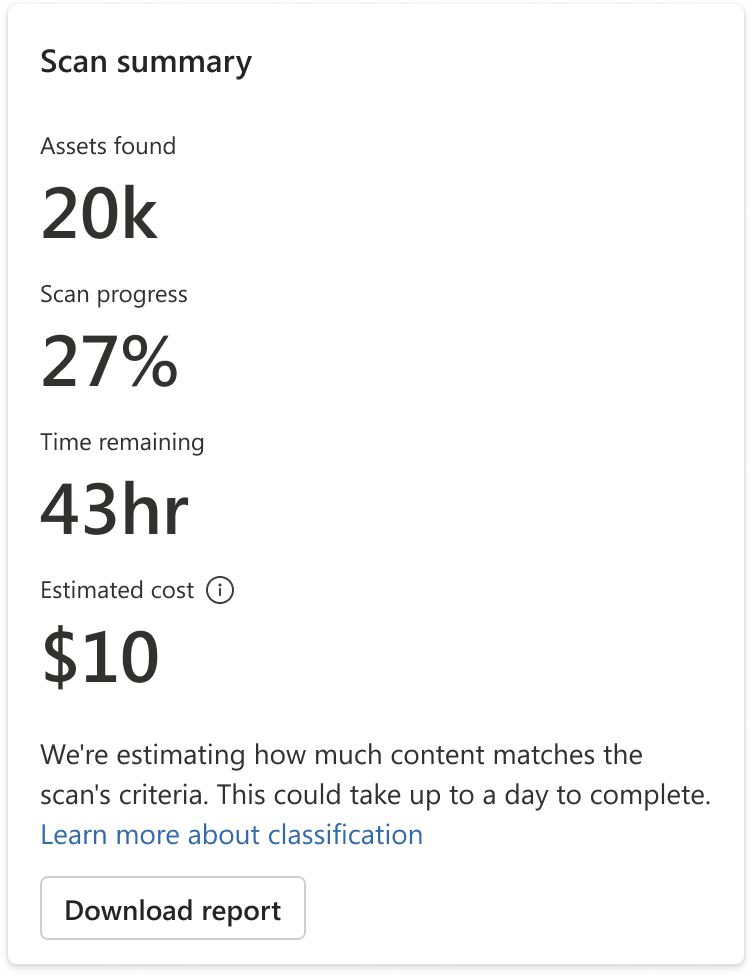






- This was the most important information for the users to decide if they would want to adjust the scope of the scan to manage costs.
- Added scan progress to indicate how many more assets could be expected when users visit this page in the in progress state. Scans for Devices could take days.
- I pushed our engineering team to provide time-related information to be added to let the users know in how much time they should come back to this page to proceed to the next step.
- Added cost estimation along with the assets found, placed it at the bottom of the list for ease of reading, as the cost is one of the top factors for deciding to start classification.
- For estimation phase added a CTA to download report right along with the data as users may have to show the reports to get budget approvals before beginning classification. Chose this over a ‘start classification’ CTA because user does not have enough information or permission to take that action yet.
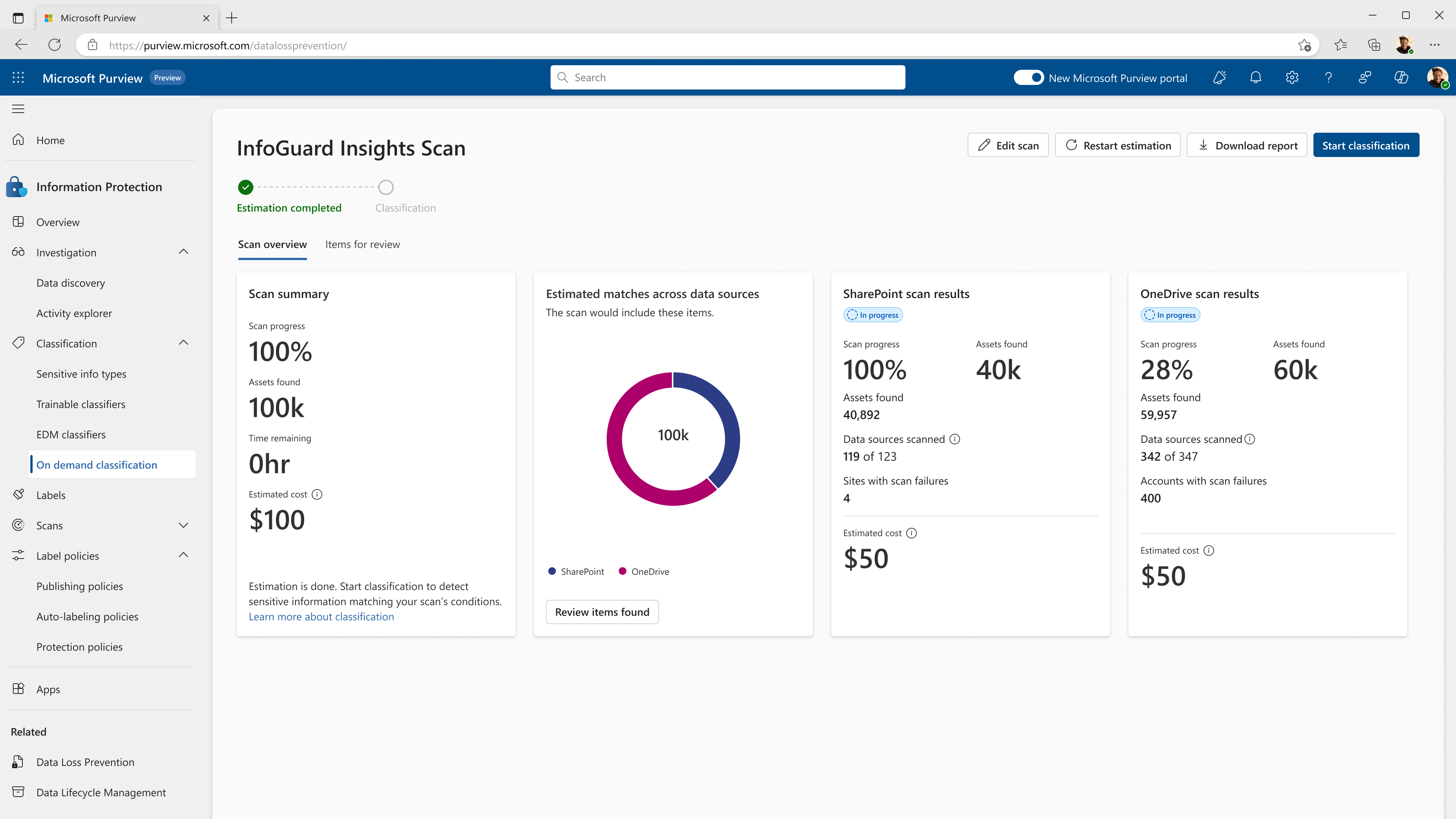
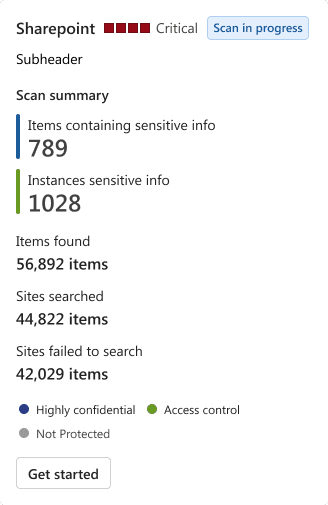
SCAN OVERVIEW - CLASSIFICATION
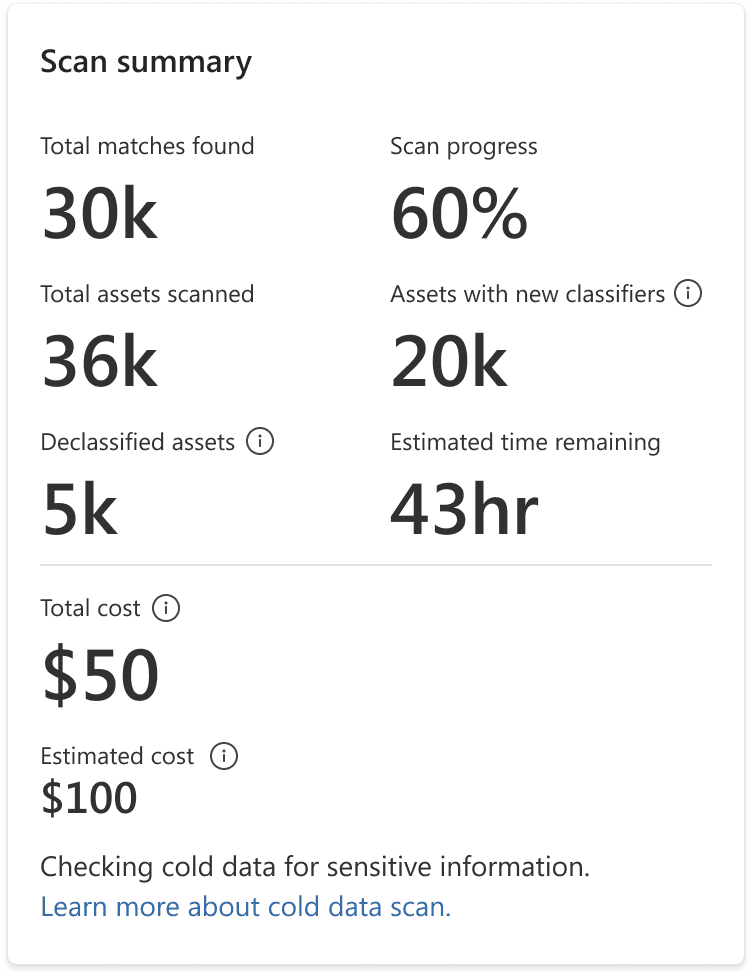



- Collaborated with content team to have self-explanatory headers and keep info tips at a minimum.
- Added total and estimated cost beside each other to remind user of the estimated cost. Transparency builds trust, and brings delight when estimation cost matches actual cost.
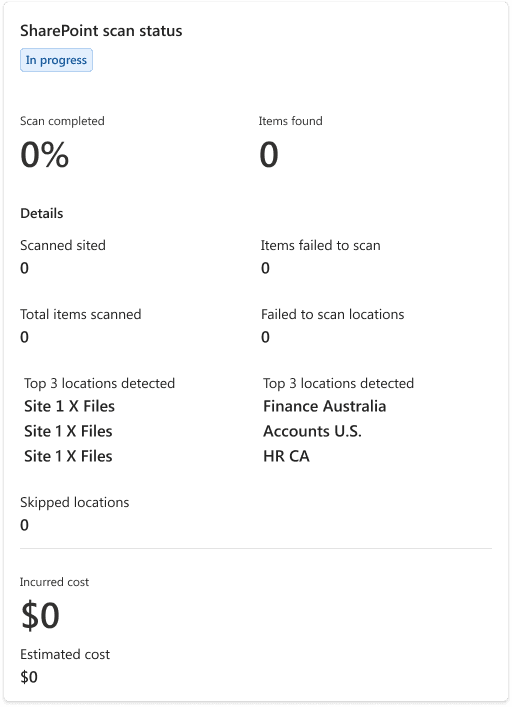
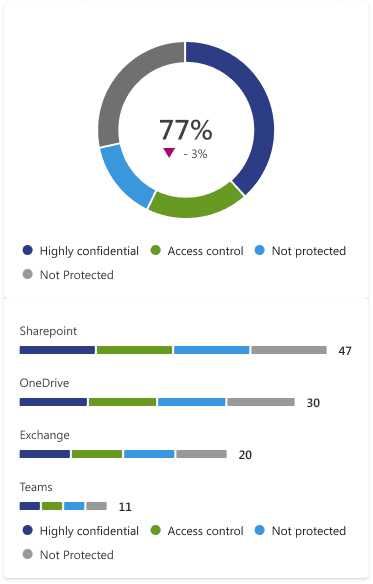
SCAN DETAILS FOR DEVICE LOCATION
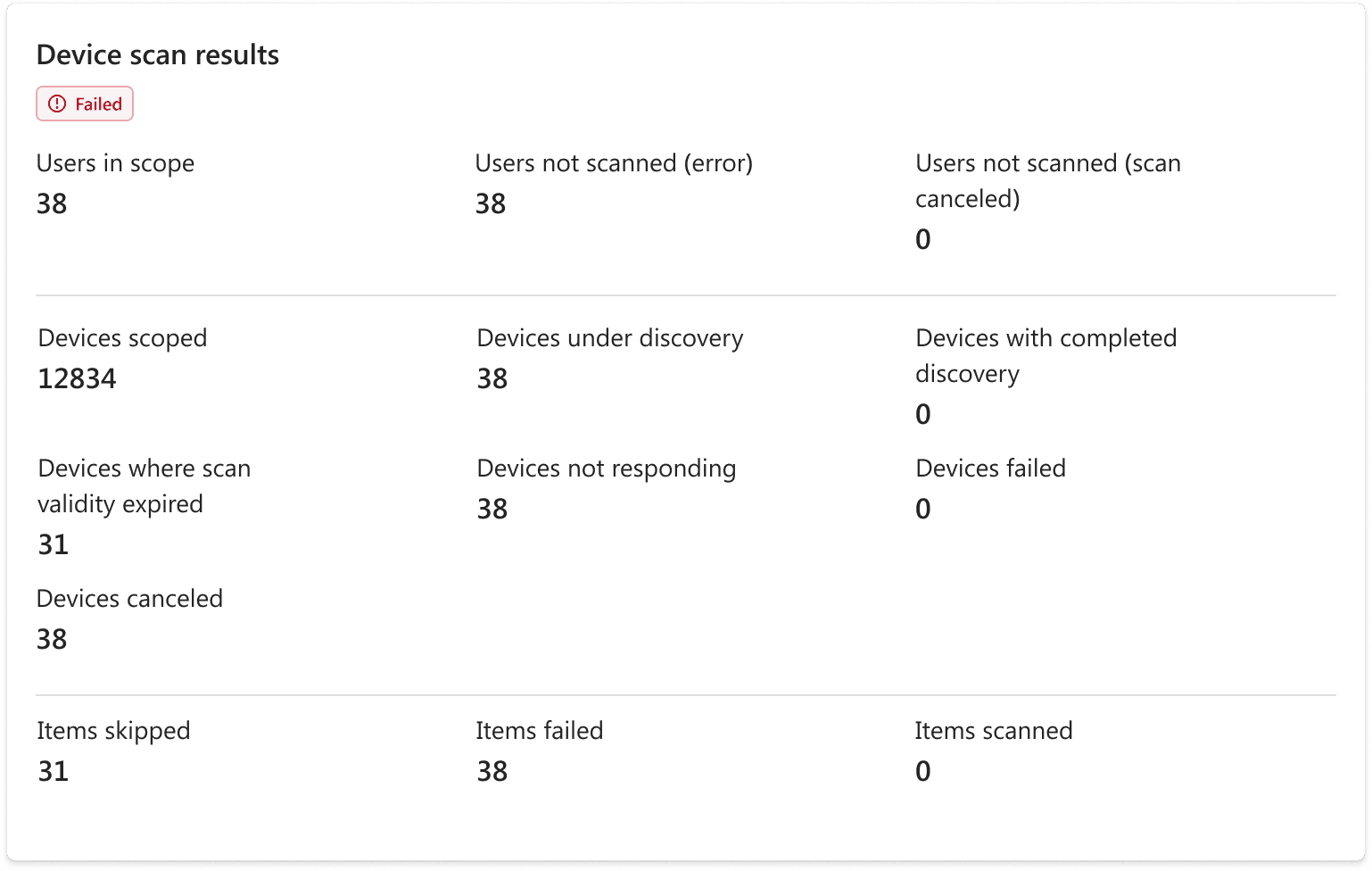
Device locations had a lot of metrics to show, I went over the Excel sheet of all the information we were capturing and discussed what should go on the card at length.
Insights from user research backed having a lot of metrics, the sentiment was ‘the more information the better’.
We picked from what the users would absolutely need to know and landed on these insights.
I grouped and segregated information and increased the dimensions of this card. This allows for better scanning.
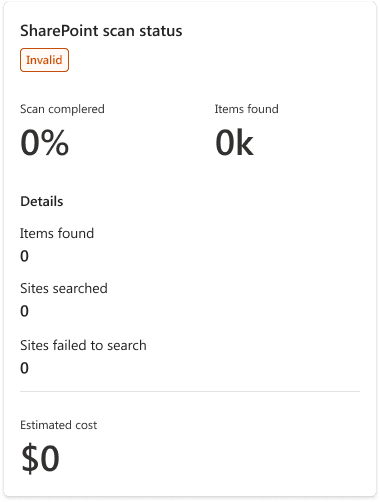
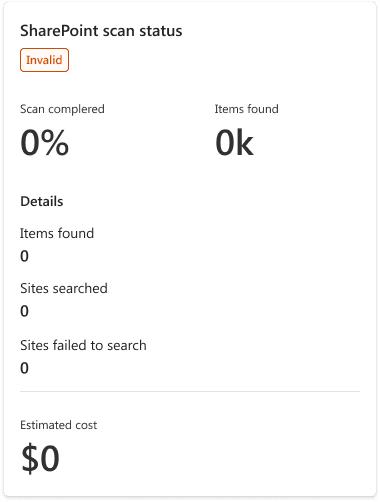
SCAN DETAILS FOR CLOUD LOCATIONS
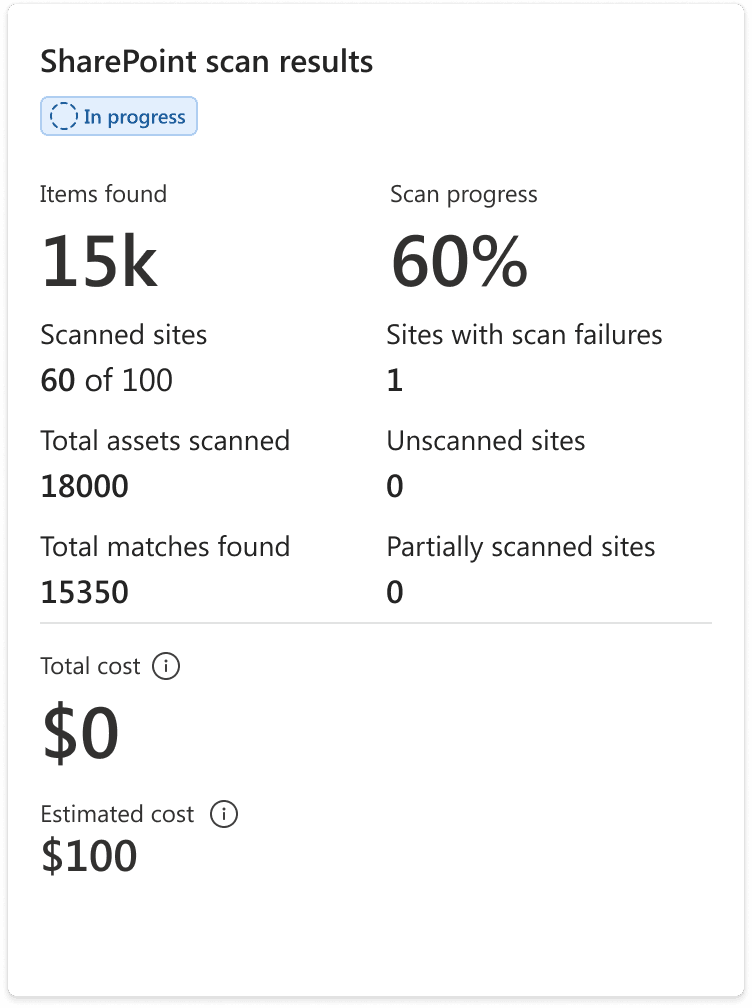
With fewer metrics to show for cloud locations, I combined it with the Items found, scan progress and cost estimations.
Each location metric card got its own status indicator because if there are two locations scoped to a scan, one could fail and one could be successful.
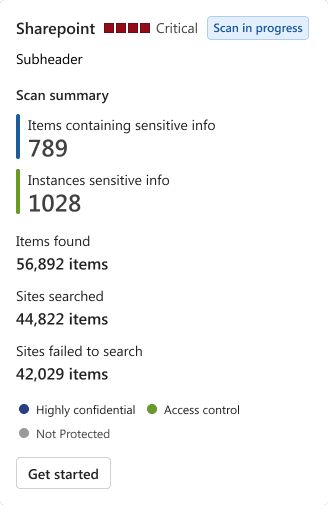
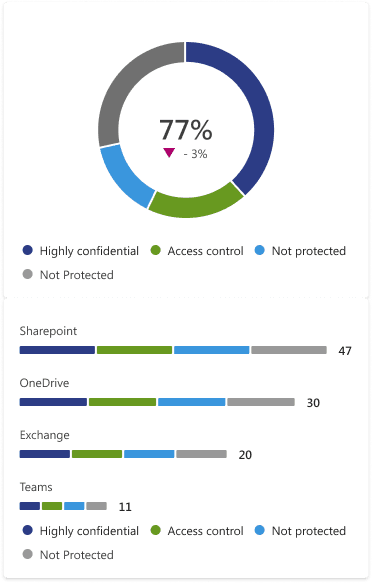
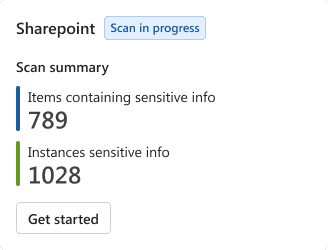
INFORMATION ARCHITECTURE AND CARD COMPONENTS EXPLORATIONS
ADDING IT ALL UP
CREATING AN ON-DEMAND CLASSIFICATION SCAN
REVIEWING ESTIMATION RESULTS AND STARTING CLASSIFICATION
REVIEWING CLASSIFIED FILES
VARIOUS ON-DEMAND CLASSIFICATION SCAN STATES AND EDGE CASES
OUTCOMES
From uncertainty to a confident decision
“...I can see the cost, I can download the report and show whoever is going to do the approvals and justify the need for scan...”
- Purview user
The experience gives admins a clear view of the information they require to make the case for the requirement of the scan for their data at rest thereby improving the organisation’s security posture.
TAKEAWAYS
Clarity is key
I learnt how important transparency and building user confidence are even if the tradeoff is more clicks for the user especially when it comes to pay-as-you-go business models. It was interesting to learn that in the face of sensitive information, costs are still a big factor.
Working within the design system
Leveraging and modifying existing components to create a custom component gets buy-in readily and is a smaller cost and effort for developers.